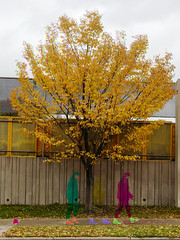
How do you translate motion onto a still image? Well, first you read the TECHtata project column and then you start shooting!
The answers are as divergent as there are pictures, but for this week's TECHtata project, we'll focus on two broad methods: Stopping Time and Motion Blur.
Stopping Time means using a fast shutter speed to create an image that's tack sharp or nearly so.
Motion Blur, in contrast, uses slow shutter speeds to show a subject as it exists in a visible range of time, all blurred together.
For this project, we want Utatans to try both ways. Stopping Time images will be tagged "techtata04A" and Motion Blur images will be tagged "techtata04B". The project page displays 2 photos per photographer, one techtata04A photo and one techtata04B photo. So please, make sure that you have both kinds of photos tagged in pairs, otherwise it won't work.
The two photos don't have to be the same subject at all, as long as we have a pair it will work okay.
Let's get moving!
Participating in this Utata project is simple! You need to do/have the following three things and then all you have to do is tag your photos techtata04A (read about other tagging options) and you're all set! Have fun!